
Four Bandsintown Alternatives That Surface Grassroots, Local Shows

The best Bandsintown alternatives fall into four categories: streaming-integrated alert apps, venue and aggregator apps, ticketing-first services, and community or local platforms. Each solves a different problem. If you want alerts synced to your Spotify library, pick a streaming-integrated app. If you want authentic, grassroots shows a mainstream algorithm never surfaces, Experiencebylocals is worth a look. Keep reading for the criteria, setup steps, and trust checks that make the choice easier.
TL;DR:
- Streaming-integrated apps can overnotify, so controlling alert frequency and customizing radius filters are key to avoiding notification overload.
- Aggregator apps that recheck listings for updates provide more reliable event information than those that post once and never revisit their data sources.
- Community platforms excel at surfacing small, local, and artist-run shows that mainstream algorithms often overlook, especially for niche interests and neighborhood events.
- Cross-checking ticket links and listings against venue websites ensures you avoid fake, duplicated, or overpriced tickets, making the checkout process more trustworthy.
- Having multiple coverage-focused apps, like Songkick and Bandsintown, complements your discovery but requires managing notifications and source preferences for optimal use.
Table of Contents
- Sites Like Bandsintown: The Four Categories Worth Knowing
- How Do You Choose the Right Concert Discovery App?
- How to Set Up Alerts Without Drowning in Notifications
- Are the Ticket Links and Listings Trustworthy?
- Why a Community-First Marketplace Beats an Algorithm for Local Shows
- Does It Connect to Spotify, Instagram, and the Apps You Already Use?
- What Do Concert Apps Cost, and What Are You Actually Paying For?
- Is the App Actually Usable on Your Phone?
- What Makes Each Type of Alternative Actually Different?
- What Should You Actually Prioritize in a Concert App?
- Ready to Find a Real Local Show Tonight?
- Where to Verify Coverage and Compare Platforms Further
- Sources
- FAQ
Sites Like Bandsintown: The Four Categories Worth Knowing
Not every concert app solves the same problem, and that's the first thing most roundups get wrong. Before you download five apps and delete four of them a week later, it helps to know what each category is actually built to do.
Streaming-integrated alert apps connect to Spotify or Apple Music and notify you when an artist you already stream is playing near you. They're the closest thing to a direct Bandsintown replacement. The upside is obvious: no manual artist follows, no missed tours. The tradeoff is real too. Reviewers have flagged that this convenience comes with heavy notification volume and inconsistent customer support, which is exactly the pain point most people searching for alternatives are trying to escape.
Venue and aggregator apps pull listings from multiple sources and merge duplicates into one clean feed. Marquee, for example, aggregates listings across sources and rechecks saved follows so a canceled or rescheduled show actually updates in your feed instead of leaving you standing outside a dark venue.
Ticketing-first services prioritize the transaction. You browse by show, buy the ticket, and the discovery layer is secondary. These work well if you already know what you want to see and just need a fast checkout.
Community and local platforms run on a different model entirely: fans, venues, and artists submit shows directly, rather than an algorithm deciding what you see. This category tends to surface small, unusual, or artist-run events that never make it into a mainstream feed.
Here's how they map to real habits:
- Casual fans usually do best with a streaming-integrated app since minimal setup matters more than depth of coverage.
- Frequent concertgoers often need an aggregator or a second service layered on top, since combining two tracking apps catches shows one service misses.
- Travelers benefit most from aggregator coverage in unfamiliar cities.
- Niche-genre and local-scene fans are consistently better served by community platforms, since those are built around submission rather than mainstream popularity.
How Do You Choose the Right Concert Discovery App?
Skip the star ratings and ask these questions instead. They cut through marketing copy faster than any review.
- How wide is the coverage? Some apps are strong in major markets and thin everywhere else. If you live outside a big metro or travel often, test this before committing.
- Does it sync with streaming services? Spotify and Apple Music integration pulls your listening history straight into alerts, which one review called a genuinely useful shortcut for catching tour dates without manual searching.
- Can you control notification frequency? Look for granular settings, not just an on/off toggle. This is where most concert apps quietly fail.
- Where do the ticket links point? Official box office and verified sellers, or a reseller marketplace with markup?
- What does it cost, and what's the catch? Free doesn't always mean free of ads, upsells, or data sharing.
- What data does it access, and how is it handled? Contact lists, location history, and streaming permissions are all fair questions to ask before you tap "allow."
Weight these differently depending on your goal. A casual fan should prioritize notification control above everything else. A frequent traveler should weight coverage breadth first. Someone chasing local, non-mainstream shows should weight community sourcing over polish.
Pro Tip: Before installing anything, search for one obscure local artist you already follow. If the app finds their next show, its coverage is probably solid for your city. If it comes up empty, that's your answer.
How to Set Up Alerts Without Drowning in Notifications
Notification fatigue is the number one reason people abandon concert apps within a month. The fix isn't turning notifications off. It's setting them up correctly the first time.
Start with the sync decision. Connecting your streaming account pulls in every artist you've ever half listened to, which sounds efficient until your phone buzzes for a band you streamed once in 2023. Manual follows take more effort upfront but keep your feed relevant.
- Set a radius filter first. Most apps default to a wide radius that pulls in shows two hours away. Narrow it to your actual travel tolerance.
- Follow venues, not just artists. A handful of favorite venues will surface new bands you'd never have searched for.
- Turn off push for tickets going on sale generally, and keep it on for artists you actively follow. This one setting change eliminates most notification spam.
- Route lower-priority alerts to email instead of push. You'll still see them, just not while you're in a meeting.
- Review your follow list every few months. Interests shift, and a stale follow list is the quiet cause of most notification overload.
Pro Tip: If an app supports both push and email, set high-priority artists to push and everything else to a weekly email digest. You get the urgent alerts without the constant buzzing.
Are the Ticket Links and Listings Trustworthy?
Verifying what you're looking at matters more than most people realize. Two problems come up repeatedly: fake or duplicate listings, and ticket links that route through resellers charging well above face value.
The fix is simple but easy to skip. Cross-check any unfamiliar listing against the venue's own site before you buy. Official venue and box office links are your safest bet; a listing that routes straight to a secondary marketplace with a markup is a signal to slow down.
- Confirm the venue name, date, and time match across at least two sources.
- Check whether the "buy tickets" button lands on the venue, promoter, or a resale site.
- Look for apps that actively recheck listings rather than posting once and forgetting.
- Review what permissions the app requests. Location and streaming access are common; contact list access for a concert app is worth questioning.
Aggregators that merge listings from multiple sources and recheck them for moved or canceled shows tend to be more reliable than apps that post once and never update. That single habit, rechecking, is a meaningful signal of listing accuracy worth watching for in any app you evaluate.
Why a Community-First Marketplace Beats an Algorithm for Local Shows
Algorithmic alert apps are built to surface what's popular. They're good at telling you when a band you already stream is passing through your city. They're far less useful for finding the K-pop choreography night at an artist-run studio or the comedy showcase happening in the back room of a coffee shop this Thursday.
That's the gap Experiencebylocals is built to close. The platform lists live music, dance, comedy, and theater hosted by community artists across Colorado, and every listing connects you directly to the host for booking. There's no algorithm deciding what deserves your attention. Community-curated platforms tend to surface smaller, artist-run, and venue-only shows that mainstream apps miss entirely, and that's precisely the kind of event a mass-market alert feed isn't built to catch.
Community platforms tend to win in a few specific situations:
- You want to discover something happening in your own neighborhood, not just touring acts passing through.
- You care about supporting local, independent artists directly rather than a promoter's cut going to a national booking agency.
- You're looking for formats that never make it onto a mainstream calendar: open mics, small dance showcases, grassroots comedy nights.
- You'd rather book directly with a host than navigate a resale marketplace.
If your goal is catching a stadium tour, an algorithmic app still does that job well. If your goal is finding what's actually happening in your city's cultural scene, a curated marketplace is built for exactly that.
Does It Connect to Spotify, Instagram, and the Apps You Already Use?
Integration quality varies more than most people expect, and it's worth checking before you commit to one app over another.
Spotify and Apple Music sync is the most valuable integration for streaming-based apps, since it pulls your listening history straight into tour alerts without you lifting a finger. One review called this kind of sync a genuinely useful shortcut for surfacing shows you'd otherwise have to search for manually. The tradeoff, as covered earlier, is notification volume, so check whether the app lets you sync for discovery while still controlling alert frequency separately.
Social integration works differently depending on the platform. Aggregator and ticketing apps often let you share a show directly to Instagram Stories or send an event link to a group chat, which matters if you're the friend who organizes everyone's concert plans. Community platforms lean the opposite direction: instead of pushing content out to social feeds, they focus on connecting you directly with the host or artist, since the point is a real relationship with a local performer rather than a broadcast.
Neither approach is wrong, but they serve different goals. If your priority is never missing a big-name tour, streaming sync matters most. If your priority is finding and supporting local talent, direct host connection matters more than a share button.
What Do Concert Apps Cost, and What Are You Actually Paying For?
Most concert discovery apps are free to browse, and the real cost shows up at checkout, not at download. Streaming-integrated and aggregator apps typically make money through advertising, ticket-affiliate commissions, or premium tiers that remove ads and unlock extra filters.
Ticketing-first services usually build their revenue into service fees added at checkout, which is why the price you see on a listing rarely matches the price you pay at the end. That gap is worth watching closely, since fees can add a meaningful percentage to the final total depending on the seller.
Community marketplaces work on a different model. Experiencebylocals doesn't charge fans to browse or discover events; it earns a commission when someone books a show directly through the platform. That means the browsing experience stays free and open, while the business model rewards the platform for connecting fans to hosts rather than for maximizing ad impressions.
When comparing costs across apps, look past the "free" label and check three things: whether there's a premium tier gating useful features, whether ticket fees are disclosed before checkout, and whether the app is quietly monetizing your data through ad targeting. A free app isn't always the cheapest one once you count what you're trading for it.
Is the App Actually Usable on Your Phone?
A concert app is only as good as the five seconds it takes to open it and find what you need. Usability issues, laggy maps, buried filters, confusing navigation, are a common complaint across the category, and they matter more than feature lists on a landing page.
Look for a few specific things before you commit to daily use. A map view that loads quickly and lets you filter by date and genre without three taps. A search bar that surfaces results as you type instead of requiring a full artist name. Clear separation between "shows I'm tracking" and "shows near me," since conflating the two is a common design flaw that makes apps feel cluttered fast.
Platform compatibility matters too, especially if you switch between a phone and a desktop browser. Some apps are mobile-only and lose functionality on desktop, which is inconvenient if you like to plan concert trips ahead of time on a bigger screen. Others build a responsive web experience alongside the app, so your saved follows and preferences carry over regardless of device.
If you're evaluating a new app, spend two minutes actually navigating it before creating an account. Open the map, search an artist, tap into a listing, and see how many steps it takes to reach a ticket link. That five-minute test tells you more about daily usability than any feature comparison chart.
What Makes Each Type of Alternative Actually Different?
Feature lists blur together fast, so it helps to focus on what's genuinely distinct rather than what's just marketing language.
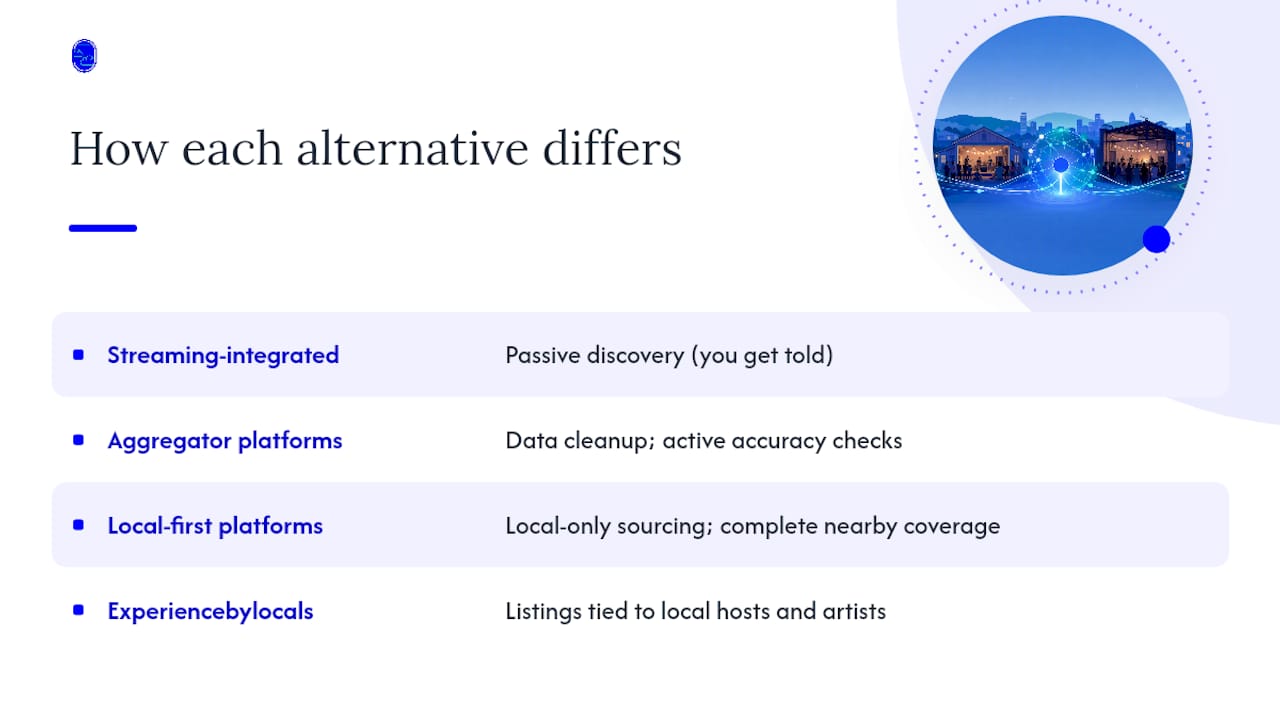
Streaming-integrated apps innovate around passive discovery: you don't search, you get told. That's a meaningful shift from the old model of manually checking artist websites, and it's the single biggest reason these apps replaced email tour newsletters.
Aggregator platforms innovate around data cleanup. Merging listings from multiple sources and actively rechecking them for accuracy sounds unglamorous, but it solves a genuinely annoying problem: showing up to a venue for a show that got moved three weeks ago and nobody updated the listing.
Local-first platforms innovate around sourcing rather than software. Instead of building a smarter algorithm, they change who gets to submit a listing in the first place. One local-focused platform frames this directly as showing all nearby shows rather than algorithm-curated feeds, which flips the entire discovery model: complete local coverage instead of a personalized guess at what you'll like.
Experiencebylocals fits into that last category with its own angle: instead of algorithmic curation or open community submission, it works with local hosts and artists directly, so every listing connects to a real person you can book with, not a scraped or duplicated entry pulled from somewhere else.
What Should You Actually Prioritize in a Concert App?
Most advice on this topic treats "more alerts" as the goal. That's backwards. The real problem with Bandsintown isn't that it lacks reach, it's that reach without control produces noise, and noise is what drives people to search for alternatives in the first place.
The conventional fix, downloading a second alert app and syncing more accounts, usually makes the noise problem worse, not better. What actually works is narrowing input before adding more of it: fewer, better follows; venue filters set on purpose; notification settings configured once and left alone.
Where the standard advice falls short is treating every concert app as interchangeable, as if the only differences are logo and color scheme. They're not. A streaming-integrated app and a community marketplace solve different problems, and picking one because it has the most users misses the point entirely.
If you're chasing a specific tour, an algorithmic app is genuinely the right tool. But if what you actually want is to feel connected to the live music scene in your own city, small venues, local artists, shows nobody nationally has heard of yet, a curated, community-first platform will consistently surface things an algorithm never will. Start there, not with whichever app has the biggest download count.
— DJ
Ready to Find a Real Local Show Tonight?
This platform offers an alternative to algorithmic concert alerts for fans seeking authentic, grassroots events rather than mainstream touring acts. Instead of waiting on a notification, you browse by city and genre and book directly with the artist or venue hosting the show.
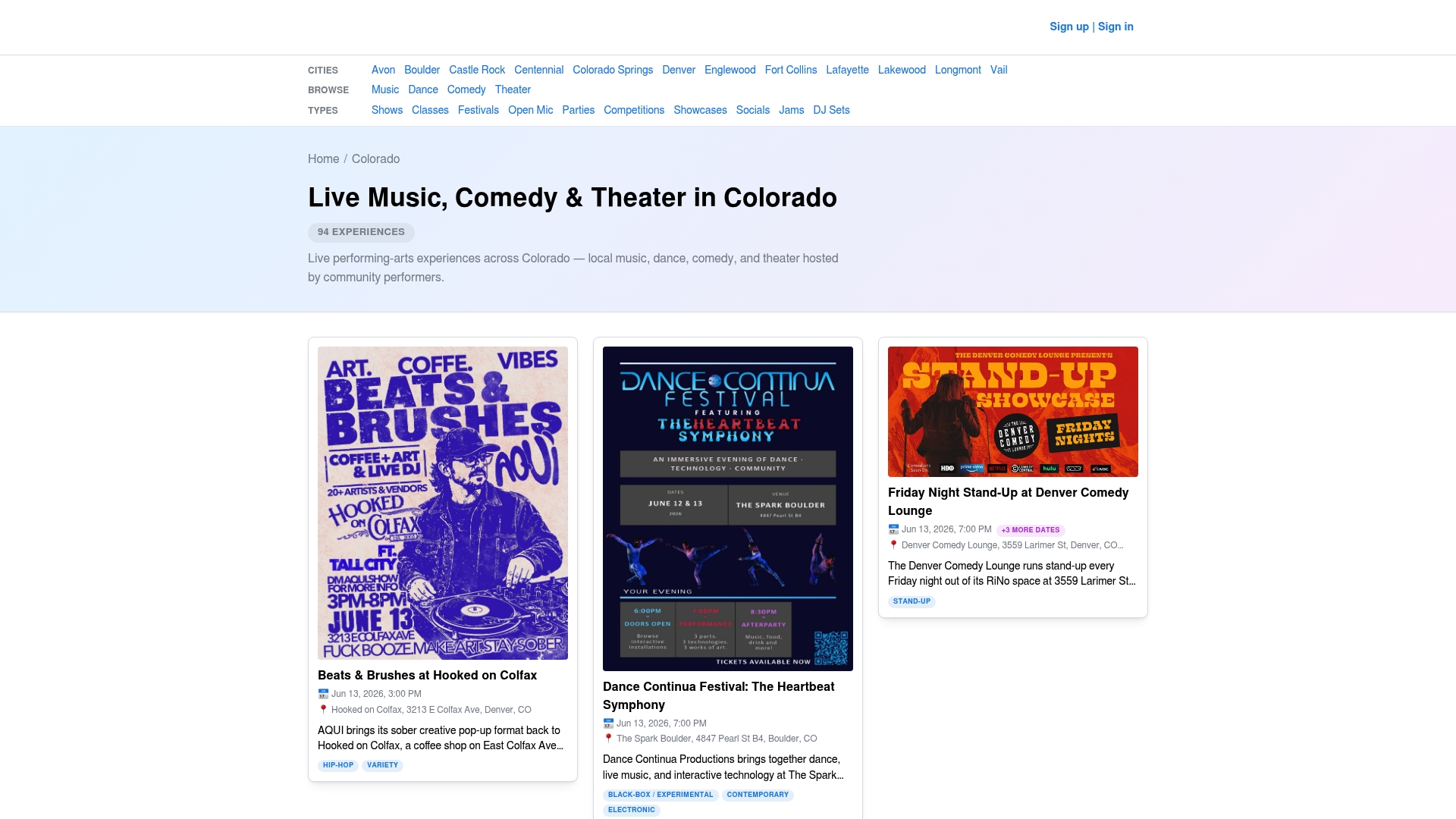
When you land on the site, you can filter by music, dance, comedy, or theater and see what's happening in your area right now. A good first move is searching your own city or browsing live music across Colorado to see the kind of grassroots talent that never shows up in a mainstream feed. From there, follow a venue you like or check out comedy shows near you if stand-up is more your scene. Ready to see what's happening this week? Browse events across Colorado and book your next show directly with the people putting it on.
Where to Verify Coverage and Compare Platforms Further
A few places are worth bookmarking if you want to dig deeper than this article. AlternativeTo hosts a large, user-ranked database of app alternatives, useful if you want to see how a niche concert app stacks up against dozens of competitors in one place. For a look at how local-first discovery works in practice, Jamr's local show listings demonstrate the community-submission model in action.
If you're researching artist-side tools alongside fan-side apps, Experiencebylocals has also covered alternatives for independent musicians and other local music discovery platforms worth comparing. Whatever you choose, cross-check an unfamiliar listing against the venue's own site before you buy.
Sources
- Concerts Near You — Every Upcoming Show in One Place · Marquee
- Bandsintown review: the concert app everyone uses but nobody loves
- This is how I never miss a concert from my favorite bands in my city — Android Authority
- Jamr - Find all live music near you
FAQ
Is Songkick Better Than Bandsintown?
Neither one wins outright. They cover different artists in different cities, which is why frequent concertgoers often run both apps side by side rather than picking one. If you travel often or follow niche artists, running two coverage-focused apps together fills gaps neither one covers alone.
Can You Trust Bandsintown?
Bandsintown is a large, widely used platform with solid streaming integration, but reviews consistently flag heavy notification volume and inconsistent customer support as recurring frustrations. Trust the coverage; go in expecting to tighten your notification settings right away.
What Is the Best App for Finding Concerts?
There isn't one universal answer, since the right app depends on what you actually want: passive streaming-based alerts, wide aggregator coverage, or authentic local and community shows. For fans who want grassroots, artist-run events in Colorado specifically, Experiencebylocals is built for exactly that use case, while national tour tracking is better served by a streaming-synced alert app.
What Are the Best Bandcamp Alternatives for Artists in 2026?
This question falls outside what this article covers in depth, since Bandcamp serves artists selling music and merch rather than fans discovering live shows. For artist-side discovery and promotion tools specifically, Experiencebylocals has a separate guide on alternatives for independent musicians worth checking instead.
How Do I Stop Concert Apps From Sending Too Many Notifications?
Start by following venues selectively instead of syncing your entire streaming library, and route lower-priority alerts to email instead of push. Reviewing your follow list every few months also keeps the noise down as your listening habits change.