
Save Fees, Keep Brand: Eventbrite Alternatives for Organizers by Type

Yes, there are cost-effective Eventbrite alternatives, and most of them keep more of your ticket revenue in your pocket. The right pick depends on what you value most: lower fees, full branding control, or onsite check-in muscle. Your next move is simple. Name your event's top priority, then run a quick fee and payout comparison against your current setup before you sign anything new.
TL;DR:
- Platforms with flat fees or low percentages can significantly reduce costs for small events, especially under 200 tickets, compared to Eventbrite's layered fees.
- Payout timing varies; platforms paying within 48 hours help manage cash flow better than those holding funds for weeks post-event.
- Custom branding options, including domains and email templates, are crucial for maintaining event identity and building attendee trust over generic checkouts.
- Onsite check-in tools must support offline scanning and multiple devices to ensure smooth entry at outdoor or high-volume events.
- Support responsiveness during events is critical; platforms with slow support can cause issues that outweigh minor fee differences.
Table of Contents
- Eventbrite Alternatives: The Main Categories to Know
- What Actually Determines Value in a Ticketing Platform?
- How Much Will an Eventbrite Alternative Actually Cost You?
- How to Switch Ticketing Platforms Without Losing Sales
- Which Platform Type Fits Your Event?
- What We've Learned From Organizers Who Switched
- Do Organizers Need a Mobile App, and How Good Are They?
- How Far Can You Really Push Branding and Customization?
- Is Your Attendee Data Actually Protected?
- Do Alternative Platforms Actually Hold Up to Reviews?
- The Real Lesson Behind the "Cheaper Alternative" Search
- How Experience By Locals Fits Into Your Ticketing Decision
- Sources
Eventbrite Alternatives: The Main Categories to Know
Every platform competing for your event falls into one of five buckets. Knowing which bucket fits your event saves you hours of comparing feature lists that don't matter to you.
- Free tier platforms — Built for community organizers and nonprofits, these often waive fees for unpaid events but recoup costs through optional donor tips or fees tucked into paid tickets. Great for meetups, but read the fine print on paid events.
- Low-fee general ticketing tools — These charge a flat rate or a small percentage instead of Eventbrite's layered fees. They fit small paid shows where every dollar of margin counts.
- White-label or embedded checkout tools — Built for organizers who want the buyer to never leave their own website. These suit venues and promoters who treat their brand as part of the product.
- Box-office and onsite solutions — Designed for high-volume festivals and touring events, with hardware for scanning, cash handling, and walk-up sales. Setup takes longer, but per-ticket costs drop at scale.
- Community RSVP tools — Built for recurring meetups and classes where the goal is attendance tracking, not payment processing. Minimal fees, minimal frills.
A quick signal check: if a platform's homepage leads with "analytics dashboard," it's courting enterprise buyers. The G2 comparison of Eventbrite and Meetup makes this split obvious: one tool wins on reporting depth, the other on low-barrier RSVP simplicity, and the right choice depends entirely on your event's goal.
What Actually Determines Value in a Ticketing Platform?
Feature lists all start to sound the same after the third demo call. What separates a genuinely cheaper platform from a rebranded version of the same problem comes down to six things.
- Fee structure and who absorbs it. Some platforms let you build the fee into the ticket price; others tack it on at checkout, which changes how "expensive" your event looks to buyers.
- Payout timing. A platform that holds funds for two weeks after your event creates a cash-flow gap that can matter more than the fee percentage itself, especially if you're paying performers or venues before the show.
- Branding depth. Does the checkout page carry your logo and colors, or does the buyer get redirected to a generic third-party page mid-purchase?
- Onsite check-in tools. Confirm whether scanning works offline, how many devices you can run at once, and whether hardware rental is included or an add-on.
- Integrations. Check for direct connections to your CRM, email platform, and accounting software, since manual exports eat up more staff time than any fee saves you.
- Support responsiveness. Ask during the demo how fast a real human responds during an active event, not just during business hours.
Organizers frequently name high fees, limited branding, slow payouts, and thin customer support as their reasons for leaving Eventbrite, according to TicketSpice's comparison guide. Those four complaints map directly onto the six factors above, which tells you where to focus your evaluation instead of getting distracted by secondary features.
Pro Tip: Ask every platform the same blunt question during your demo call: "If my event sells out and I need a refund pushed through in 24 hours, what actually happens?" Their answer reveals more about support quality than any feature sheet.
How Much Will an Eventbrite Alternative Actually Cost You?
Total cost breaks down into four pieces: the platform's own fee, payment processing (usually 2.9% plus a small flat charge per transaction), any applicable sales tax, and buyer-facing service fees the platform tacks onto the ticket price. Add those together per ticket, multiply by expected volume, and you have a real number to compare against Eventbrite's current bill.
Three quick examples show how differently this plays out:
- A free community open mic with no tickets sold. A "free" platform might cost you nothing upfront, but some rely on optional donor tips or restrict their no-fee tier strictly to unpaid RSVPs, a distinction Zeffy's alternatives guide spells out clearly. If you later add a $5 suggested donation ticket, check whether that flips you into a paid tier.
- A 60-person paid workshop at $40 a ticket. A flat-fee platform charging $1 per ticket costs you $60 total. A percentage-based platform at 3.5% plus processing could run closer to $130 to $150, depending on the processor. That gap is real money for a small workshop.
- A 3,000-ticket festival. Volume pricing through a box-office-style provider can knock per-ticket costs down substantially compared to retail pricing, according to TicketSource, but only if you budget for the added staffing and hardware needed to run onsite operations.
Payout timing changes this math further. A platform that pays out within 48 hours protects your cash flow for venue deposits and performer payments; one that holds funds for two weeks post-event does not, no matter how low its fee looks on paper.
How to Switch Ticketing Platforms Without Losing Sales
Migrating platforms mid-season feels risky, but a structured switch protects both your revenue and your attendees' trust.
- Export your attendee and sales data first. Confirm the new platform accepts your export format before canceling anything with your current provider.
- Build a test event and run a full dry run. Buy a ticket yourself, scan it at check-in, and issue a test refund to confirm every step works.
- Tell your attendees directly. A short email explaining the change, with instructions for existing ticket holders, prevents a flood of confused support requests.
- Time the switch around payout windows. Don't cancel your old account until its final payout has cleared, or you risk a cash-flow gap.
- Run one final onsite dry run before doors open. Test scanning hardware, offline mode, and your reconciliation report the day before the event, not the morning of.
Organizer forums back this up with a common pattern: many run a two-week overlap, keeping old ticket sales open just long enough to settle final payouts while testing the new checkout on a small private event, based on organizer discussions on Reddit. That overlap window costs nothing and catches problems before they touch a real audience.
Which Platform Type Fits Your Event?
Matching platform category to event type is where most of this guide pays off. Here's how priorities shift by event profile.
- Recurring meetups and community classes need low or no fees and simple RSVP tracking more than payment processing muscle. A community RSVP tool or a free-tier platform fits best here.
- Local concerts, comedy nights, and small ticketed shows live or die on branding. If your buyer bounces to a generic checkout page mid-purchase, you lose the local, grassroots feel that makes these events distinct. A white-label or embedded checkout tool protects that.
- Festivals and high-volume events need box-office tools, point-of-sale hardware, and staff trained on scanning workflows. Fee savings only materialize if your onsite operation runs smoothly.
- Tours, attractions, and recurring bookings need scheduling and inventory control more than one-off ticketing. Look for platforms built around calendar management, not single-event sales pages.
- When self-serve ticketing isn't the answer. If discoverability, not checkout mechanics, is your real bottleneck, a marketplace or promoter relationship that puts your event in front of a built-in local audience can outperform any DIY platform switch. Swapcard's comparison guide to Eventbrite alternatives reinforces category-fit as the right first filter, ahead of comparing individual vendor features.
If you run recurring shows at a specific venue, it's worth checking how venue-specific alternatives approach ticketing differently than general-purpose tools.
What We've Learned From Organizers Who Switched
The organizers we've talked with who left Eventbrite usually saved the most money on events under 200 tickets, where flat fees beat percentage-based pricing by a wide margin. The biggest headache wasn't the platform switch itself. It was underestimating how long attendee communication takes when buyers don't understand why their old ticket link stopped working.
The organizers who switch smoothly are the ones who treat the migration like a small event of its own: a test run, a clear announcement, and a buffer week before doors open. The ones who struggle are the ones who flip the switch overnight and hope nobody notices.
Pro Tip: If you're choosing between two platforms and can't decide, pick the one that makes it easiest for a stranger to find your event in the first place. Ticketing fees are meaningless if nobody shows up.
Experiencebylocals approaches this from a different angle: beyond processing tickets, it helps performance-focused organizers get discovered by local audiences actively looking for authentic shows, not just tourists scanning a generic events calendar.
Do Organizers Need a Mobile App, and How Good Are They?
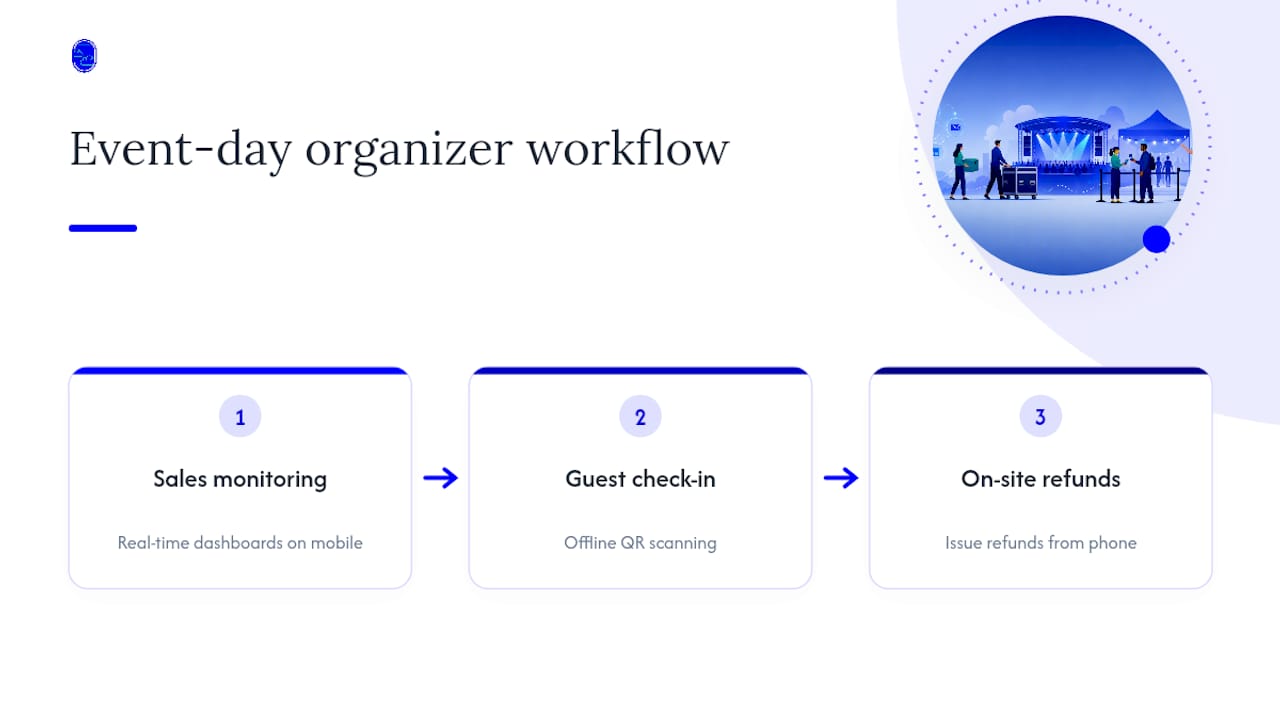
A mobile app matters differently for you than it does for your attendees. On the organizer side, look for real-time sales dashboards, offline check-in scanning, and the ability to issue a refund from your phone during a live event, not just from a desktop later. Offline scanning specifically matters at outdoor festivals or rural venues where cell signal drops without warning.
On the attendee side, the bar is lower but non-negotiable: a mobile wallet ticket (Apple Wallet or Google Wallet), a QR code that loads without an app install, and a checkout that doesn't require creating a new account just to buy one ticket. Every extra step between "I want this ticket" and "I have this ticket" costs you conversions, especially on mobile where attention spans are short.
Test both sides yourself before committing. Buy a test ticket on your own phone, then scan it using whatever hardware or app your check-in staff will actually use on event night. Plenty of platforms look polished in a sales demo and fall apart the moment you try to scan a ticket with spotty Wi-Fi and a line of impatient guests behind it. That gap between demo and doors-open reality is where most onsite problems start.
How Far Can You Really Push Branding and Customization?
Basic branding control, your logo on a checkout page, only scratches the surface of what separates a rebranded ticket form from an experience that feels like your own. Look past the logo upload and check whether the platform lets you customize the buyer's entire path, from event page layout to confirmation email design to the domain name buyers see in their browser bar.
Custom domains matter more than most organizers realize. A checkout URL that reads tickets.yourvenue.com feels dramatically more trustworthy than a generic subdomain buried under a ticketing company's own brand. Some platforms include this at every tier; others gate it behind their highest-priced plan, so ask directly during your demo instead of assuming.
Confirmation emails and reminder messages are another overlooked lever. If a platform sends a bland, generic reminder email with the ticketing company's own logo instead of yours, that's a missed touchpoint with your audience right before your event. For recurring organizers building a following, that consistency compounds over time into real brand recognition, not just a one-off transaction.
Is Your Attendee Data Actually Protected?
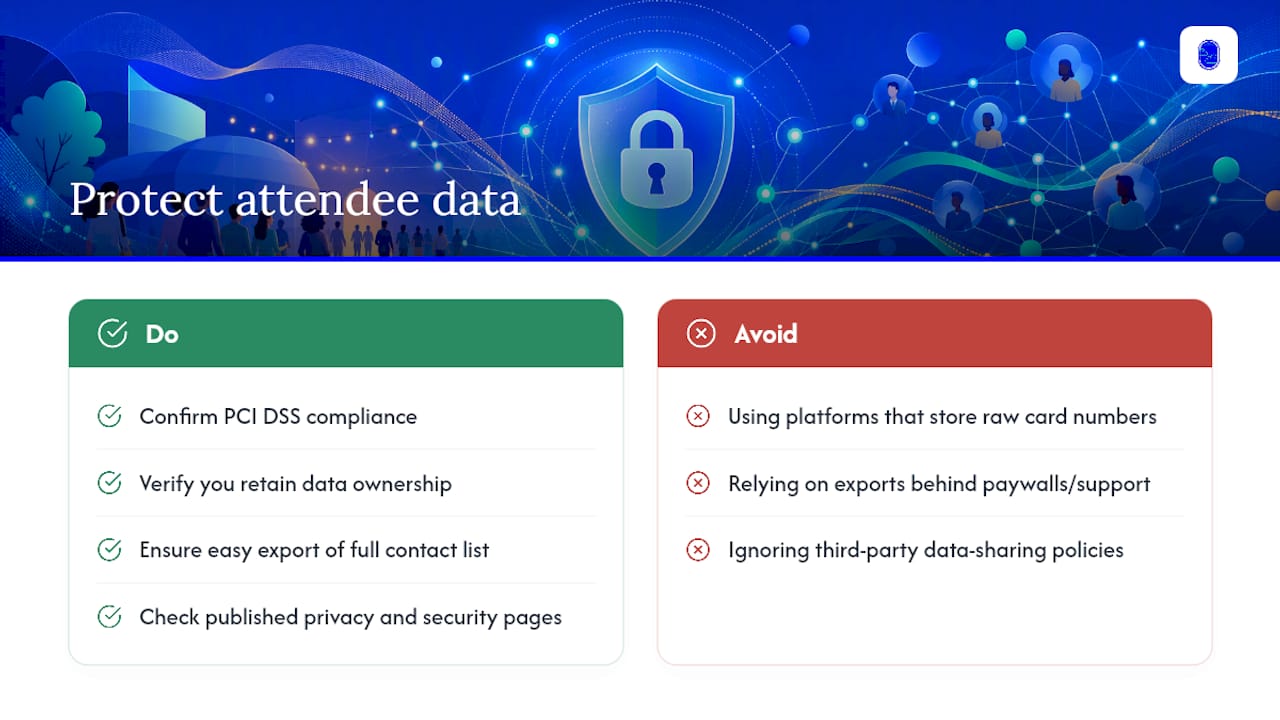
Ticketing platforms handle sensitive information: names, emails, and payment details for every buyer who trusts you with their card. Confirm any platform you're considering is PCI DSS compliant for payment processing, which means it doesn't store raw card numbers on its own servers and instead routes that data through a certified processor.
Ask specifically how attendee data gets stored and whether you retain ownership of your own list if you leave the platform. Some tools make exporting your full contact list simple; others bury it behind support tickets or paid add-ons, which becomes a real problem the day you decide to switch. Also check the platform's policy on data sharing with third parties, since some ticketing tools sell aggregated attendee data to advertisers without making that clear upfront.
For events collecting anything beyond basic contact details, dietary restrictions, accessibility needs, ask how that information gets handled and who on the organizer side can see it. A platform with clear, published privacy policies and a real security page beats one that buries this information or doesn't mention it at all.
Do Alternative Platforms Actually Hold Up to Reviews?
Review platforms like G2 and Capterra give you something vendor marketing pages never will: unfiltered organizer complaints. Reading reviews for tools like Splash reveals patterns around community management and analytics strengths that align with specific organizer needs, according to Capterra's review summary, which is exactly the kind of dimension-based comparison worth reading before you commit.
Pay attention to how reviewers describe support response times specifically during live events, not just during setup. A platform can score four and a half stars overall while still drawing complaints about disappearing support the moment an event actually starts. Also watch for a pattern in low-rated reviews. If multiple reviewers across different time periods flag the same complaint (slow payouts, hidden fees, clunky check-in), that's a structural issue, not a one-off bad experience.
Don't skip the response section either. How a company replies to a negative review, defensive versus genuinely helpful, tells you something about what kind of support you'll get when something goes wrong at your own event.
The Real Lesson Behind the "Cheaper Alternative" Search
Most guides comparing Eventbrite alternatives fixate on fee percentages and call it a day. That misses the bigger issue: fees are the easiest number to compare and the least predictive of whether a platform actually serves your event well. A platform charging 1% less that holds your payout for three extra weeks can hurt you more than one charging slightly more with next-day payouts.
The conventional advice tells you to shop by price. Better advice tells you to shop by category fit first, then compare pricing within that category. A festival organizer comparing box-office tools against community RSVP tools is comparing apples to parking lots. Start narrower.
If there's one thing worth prioritizing above all else, it's this: pick the platform category that matches your event's actual operational needs, run the fee math second, and treat branding and discoverability as equal partners to cost, not afterthoughts. The cheapest platform that nobody can find your event through isn't actually cheap.
— DJ
How Experience By Locals Fits Into Your Ticketing Decision
If you're weighing platform categories, low-fee tools, white-label checkouts, box-office systems, the missing piece for a lot of Colorado organizers isn't ticketing mechanics. It's getting found by the right local audience in the first place. A local experience platform solves that side directly, listing authentic live music, dance, comedy, and theater events so locals and visitors searching for real experiences, not tourist-trap filler, can find your show and book it.
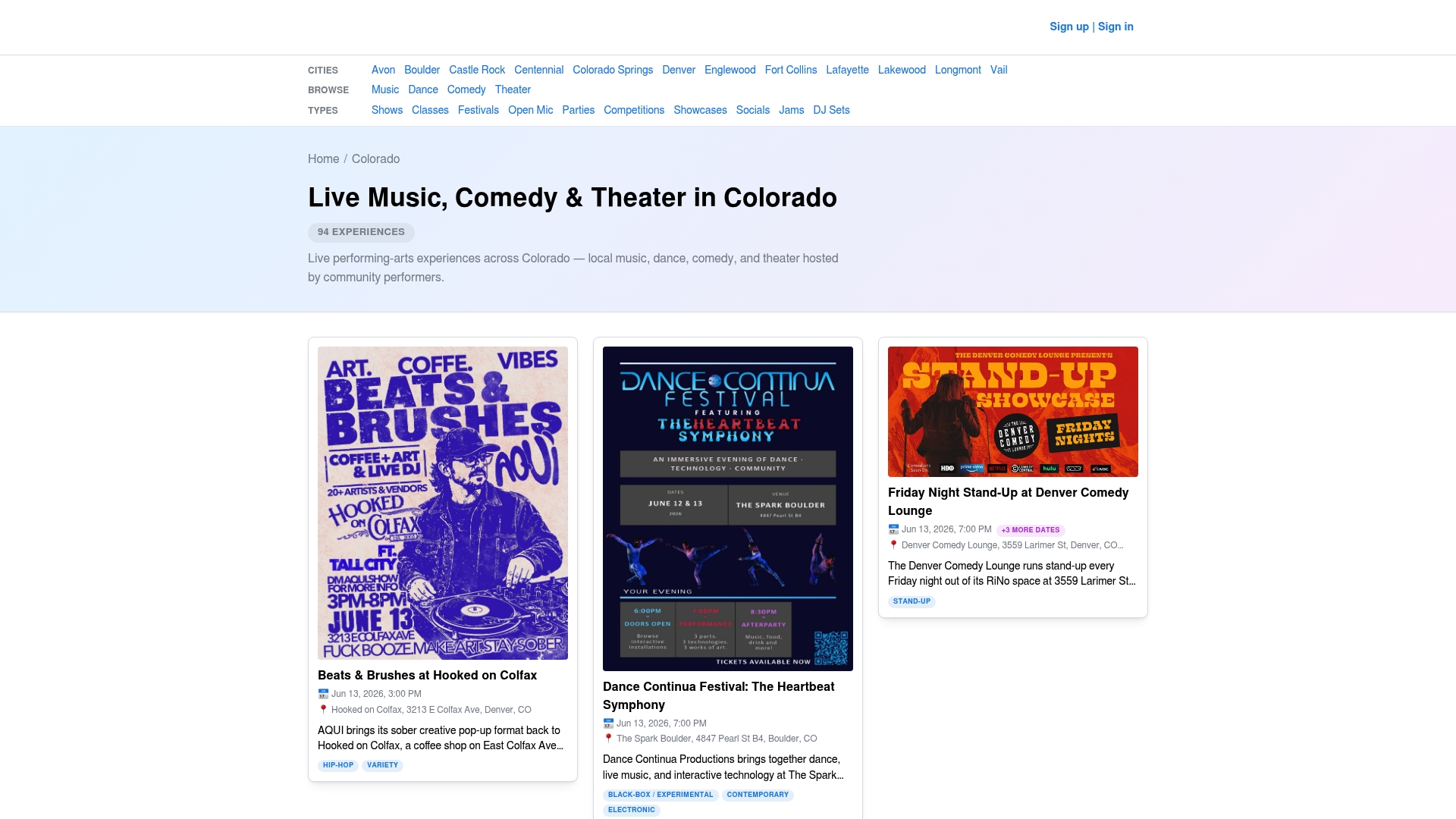
It may earn revenue only through a referral fee when someone books through a listing, so there may be no flat cost sitting between you and getting discovered. If you run recurring shows or are building a following in Colorado's live music scene, pairing your existing ticketing setup with a listing on Experiencebylocals adds a discovery channel most self-serve platforms simply don't offer. Browse current Colorado listings to see how your event type fits, then reach out through the promoter page to get your show in front of an audience actively looking for it.
Sources
For deeper comparisons, G2's Eventbrite vs. Meetup breakdown covers enterprise-versus-community fit, TicketSpice's alternatives roundup details common switching complaints, Zeffy's guide explains free-tier fee models, and Swapcard's comparison maps vendors to event types. For operational guidance on the event day itself, see Alex Levin Music's guest experience guide.
- Eventbrite vs Meetup: Side by Side Comparison | G2
- 5 Best Eventbrite Alternatives in 2026 (Ranked & Compared) | TicketSpice
- Top Free Eventbrite Alternatives (2026): Keep Every Dollar You Raise | Zeffy
- Top 11 Eventbrite Alternatives for Event Registration | Swapcard